
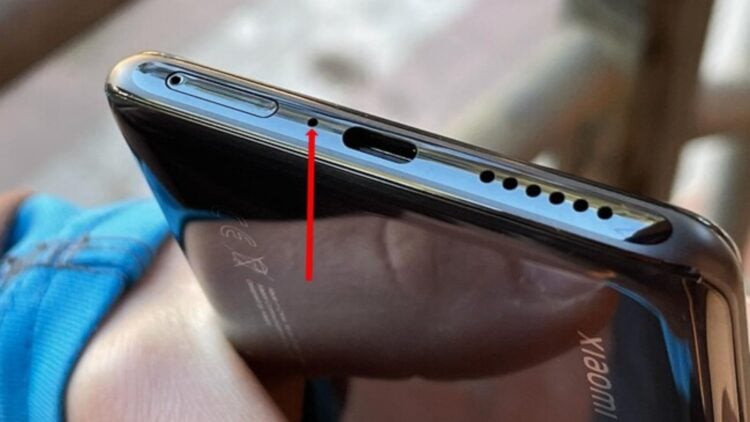
Have you ever wondered what that little hole next to the charging port on your Android phone is? For those who don’t know, it’s the phone’s main microphone. In the case of Apple, the iPhone has the microphone in a different place, depending on the model (next to the speakers, on the sides, next to the camera). Mobile devices have a main microphone and other secondary microphones that help capture ambient sound and ensure that WhatsApp audio messages or any other recorded files can be heard with good quality and clarity.
These holes get dirty easily, especially if they are carried unprotected in pockets. That is why it is important to keep them clean to prevent them from becoming clogged and to extend their useful life. To remove dust, the most recommended options are compressed air, soft bristle brushes, or cotton swabs that allow you to reach the holes without damaging the smartphone’s components.
Components of a smartphone
Beyond the hardware and software we see in devices, there are some elements that, although visible to the naked eye, do not catch our attention and we overlook them. This is the case with microphones, which, depending on the phone, are usually located in one place or another. In the case of Android models, it is usually found next to the charging port. Yes, that little hole is the microphone. In the case of Apple, the iPhone has it located in different places depending on the model (next to the speakers, next to the front camera, on the sides, etc.).
Primary and secondary microphones
The main function of the microphone in a mobile device is to capture the voice clearly and intelligibly, whether in calls or voice messages. Secondary microphones are more geared towards filtering out external noise to improve audio clarity, so that you can hear clearly and distinctly even in noisy environments.
Cleaning your phone
Regardless of the model and where the main microphone (and secondary microphones) are located, it is very important to keep them clean, as they are a sensitive area where dust tends to accumulate. The first and most important thing to keep in mind is not to use sharp objects or liquids, as this could damage or completely break the microphone.
We recommend using soft bristle brushes or plastic or wooden sticks with cotton tips, which allow you to reach the holes more easily. It is important not to apply pressure, but to do so gently so as not to damage the microphone. Another effective method is to use compressed air, which you can find in specialized stores.
Smartphone care
Extending the life of a mobile device depends not only on keeping the speakers and microphones clean, but also on taking a number of general precautions.
- Use a case and screen protector to protect it from impacts and drops.
- Keep the battery between 20% and 80%, do not let it discharge completely or charge it to 100%.
- Use official or certified chargers, otherwise you could be using chargers with different voltages and damaging the battery.
- Avoid extreme temperatures, such as prolonged exposure to the sun or extreme cold, which can affect the device’s internal circuits.
- Protect it from water and moisture. Although some cell phones are designed to be submerged to a certain depth, constant exposure can damage the protective seals.
These tips are useful for preserving and extending the life of smartphones, regardless of brand, which have become an essential everyday tool. There is no reason to replace them every year just because a new version comes out (which is usually exactly the same as the previous one).